Flag visitor
 23.23 |
  Diposting oleh
almer el hawari.blogspot.com |
Diposting oleh
almer el hawari.blogspot.com |


 Label:

 indo baru
by almer el hawari

- Titi DJ - Tak Ada Ujungnya
- Wali - Aku Bukan Bang Toyib (CDRip)
- Melly Goeslaw - Yuk Kita Jadian (Ost. Kabayan Jadi Milyuner)
- Melly Goeslaw - Jika Aku Menjadi
- She - Takkan Ada Lagi Patah Hati (Ost. Aku Atau Dia)- VA - Garuda Spirit (Full Album 2010)
Butterfly - Mencintai Dua Hati
Vierra - Takut (new single 2011)
Afgan - Dalam Marhab Cinta (Ost. Dalam Marhab Cinta)
by almer el hawari

Download »
Download »
- Afgan - Dalam Marhab Cinta.mp3
- Afgan - Cinta Satu Malam (Live).mp3
- Afgan - Dia Dia Dia (Acoustic)
- 1. Tak Peduli
- 2. Cinta 2 Hati
- 3. Bukan Cinta Biasa
- 4. Wajahmu Mengalihkan Duniaku
- 5. Bawalah Cintaku
- 6. Dia Dia Dia
- 7. Panas Asmara
- 8. Masih Untukmu
- 9. Semurni Kasih
- 10. Rumahmu Jauh
- 11. Seperti Bintang
CAS - Yang Terbaik [2011]-H2O
by almer el hawari
CAS - Yang Terbaik [2011]-H2O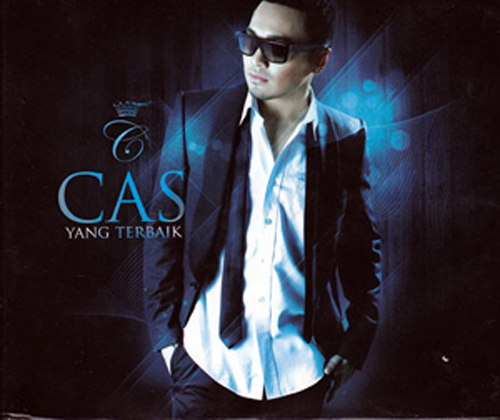
CAS - Yang Terbaik [2011]-H2O
ARTIS...: CAS
ALBUM TITLE...: CAS - Yang Terbaik
Release of Year...: 2011
Bitrate...: 128Kbps
Size...: 45MB
TRACKLIST
01. Teman Curhat
02. Yang Terbaik
03. Harus Bagaimana
04. Cinta Denganmu
05. Apa Yang Kau Mau
06. With You (feat. Dewi Sandra)
07. Superstar
08. Mingle With You
09. You Got What I Need
10. Karena Ku Yakin
11. No One Else
12. Stays Here
13. Hanya Satu
14. Ku Pergi`missing`
CAS - Yang Terbaik [2011]-H2O | 45MB
Hotfile
http://hotfile.com/dl/97579289/27c1f93/CAS-Yang-Terbaik-2011-H2O.zip.html
Fileserve
http://www.fileserve.com/file/EzBv7T5/CAS-Yang-Terbaik-2011-H2O.zip
CAS - Yang Terbaik [2011]-H2O
CAS - Yang Terbaik [2011]-H2O
ARTIS...: CAS
ALBUM TITLE...: CAS - Yang Terbaik
Release of Year...: 2011
Bitrate...: 128Kbps
Size...: 45MB
TRACKLIST
01. Teman Curhat
02. Yang Terbaik
03. Harus Bagaimana
04. Cinta Denganmu
05. Apa Yang Kau Mau
06. With You (feat. Dewi Sandra)
07. Superstar
08. Mingle With You
09. You Got What I Need
10. Karena Ku Yakin
11. No One Else
12. Stays Here
13. Hanya Satu
14. Ku Pergi`missing`
Hotfile
http://hotfile.com/dl/97579289/27c1f93/CAS-Yang-Terbaik-2011-H2O.zip.html
Fileserve
http://www.fileserve.com/file/EzBv7T5/CAS-Yang-Terbaik-2011-H2O.zip
ACDSee Systems Canvas with GIS Plus 12.0 Build 1398
by almer el hawari

ACDSee Systems Canvas with GIS Plus 12.0 Build 1398 | 136 MB
Canvas 12 with GIS+ is the only GIS data visualization solution in the market that allows GIS professionals – in the oil, gas, and energy sectors, aerospace and automotive industries, education, and government – to accurately communicate the results of their research analysis inside a true graphics application. Canvas 12 with GIS+ is loaded with new tools to provide greater control over technical illustrations, enable more powerful publishing and collaboration, and streamline overall workflows. Simply import GIS project information and use Canvas 12’s powerful vector object illustration and advanced raster image editing tools to assemble, annotate and enhance your data - in one integrated, flexible design environment. Speed up and streamline your workflow from initial import and design to final presentation, facilitate collaboration, and improve overall productivity with the complete technical illustration and GIS data visualization solution.• Handle it all – including GIS file formats
Canvas 12 with GIS+ can handle all your data import needs. In addition to the 100+ file formats, including DXF, DWG, CGM, Adobe®1 PDF, and RAW that comes standard in Canvas 12, the GIS+ module supports 18 GIS specialized file types, such as SHAPE, MapInfo and ARC/INFO. Augment, apply effects, and export to another format. You can even export to multiple formats simultaneously.
• Work flexibly with vector objects
Illustrate, edit and augment all forms of complex visual objects with Canvas 12's wide variety of professional tools and powerful Sprite technology. New features allow you to rejoin segment objects into one and fill the intersections of overlapping objects with a single click, while its proprietary SpriteLayers and SpriteEffects can be used to apply image and transparency effects without affecting the original object.
• Access raster image editing tools
Why work within limits? Canvas 12 comes complete with a full suite of raster image editing features. Create, edit and augment raster images with a host of industry standard and specialized techniques, tools and filters. Design image compositions, retouch photos, paint and color-correct scanned images, create transparency effects and vignettes, age photos, clone pixels and much more. Work with both raster images and vector images at the same time, with access to the same tools, to enhance objects and images in countless ways, all in a georeferenced environment.
• Draw and dimension with precision
Create visuals from both raw and technical data. Choose from a variety of methods to input your exact coordinates, and Canvas 12, with its ability to represent any object property to within .035 microns, accurately turns your data into strong, real-time visual content that you can then enhance, review and publish. Resize and scale objects, add fill and stroke inks, widths and other attributes, and draw shapes – all with measured precision and placement.
• Add on-the-fly illustration objects
Instantly add re-usable dynamic objects to your georeferenced work. Access hundreds of commonly used and specialized technical symbols from Canvas 12's pre-loaded Symbol Library collection, or create your own custom symbols using any vector, text or composite object. You can also create custom symbol links and pen strokes, and manage them all with flexibility. Move, add keywords, and re-categorize symbols to match your unique workflow needs.
• Make the most of your GIS data
Apply a host of image filters, transparency effects, annotation tools, image warping techniques, in addition to visual analysis and symbology tools, to create an easy-to-understand representation of your georeferenced work.
• Integrate into seismic and petrochemical workflows
Canvas 12 with GIS+ fully supports CGM*PIP files, helping increase productivity and streamline seismic-related workflows. Its CGM*PIP Import filter has received acclaim for its ability to successfully work with files from UNIX-based seismic interpretation applications. You can also import raw seismic visual data, augment, annotate, color and edit it numerically, and then combine the results with professionally formatted text in a multi-page document ready for sharing – all in a single environment. Throughout the process, illustrations and documentation retain the high level of accuracy demanded by professionals within the seismic and petrochemical industries.
• Say goodbye to distractions
Since the GIS+ module is integrated within Canvas 12, you benefit from all of its intuitive interface and customizable tool and menu options designed to make it easy to find what you need. Enjoy one stop access to inks and styles, organize your workspace to maximize productivity, and work faster with shortcuts, smart toolboxes, and interface enhancements.
• Publish your GIS data professionally
Create great-looking publications and presentations of your GIS data, in collaboration with colleagues. Canvas 12 has everything needed to design professional documents and presentations, including the Symbol Library and pre-installed Canvas symbol sets, top quality raster image rendering, robust page and text formatting, flowchart integration, and a host of pre-press tools. Apply password and encryption protection, and share your enhanced GIS data in a variety of print and Web-ready presentation formats, including HTML and Adobe® PDF complete with interactive hyperlinks.
Home Page - http://www.acdsee.com

Fileserve
http://fileserve.com/file/dW2cSxZ
Filesonic
http://www.filesonic.com/file/59372696/ACD.Systems.Canvas.with.GIS.Plus.v12.0.1398.rar
Hotfile
http://hotfile.com/dl/99101698/9785978/ACD.Systems.Canvas.with.GIS.Plus.v12.0.1398.rar.html
Bitshare
http://bitshare.com/files/xekhmsqk/ACD.Systems.Canvas.with.GIS.Plus.v12.0.1398.rar.html
ACDSee Systems Canvas with GIS Plus 12.0 Build 1398 | 136 MB
Canvas 12 with GIS+ is the only GIS data visualization solution in the market that allows GIS professionals – in the oil, gas, and energy sectors, aerospace and automotive industries, education, and government – to accurately communicate the results of their research analysis inside a true graphics application. Canvas 12 with GIS+ is loaded with new tools to provide greater control over technical illustrations, enable more powerful publishing and collaboration, and streamline overall workflows. Simply import GIS project information and use Canvas 12’s powerful vector object illustration and advanced raster image editing tools to assemble, annotate and enhance your data - in one integrated, flexible design environment. Speed up and streamline your workflow from initial import and design to final presentation, facilitate collaboration, and improve overall productivity with the complete technical illustration and GIS data visualization solution.• Handle it all – including GIS file formats
Canvas 12 with GIS+ can handle all your data import needs. In addition to the 100+ file formats, including DXF, DWG, CGM, Adobe®1 PDF, and RAW that comes standard in Canvas 12, the GIS+ module supports 18 GIS specialized file types, such as SHAPE, MapInfo and ARC/INFO. Augment, apply effects, and export to another format. You can even export to multiple formats simultaneously.
• Work flexibly with vector objects
Illustrate, edit and augment all forms of complex visual objects with Canvas 12's wide variety of professional tools and powerful Sprite technology. New features allow you to rejoin segment objects into one and fill the intersections of overlapping objects with a single click, while its proprietary SpriteLayers and SpriteEffects can be used to apply image and transparency effects without affecting the original object.
• Access raster image editing tools
Why work within limits? Canvas 12 comes complete with a full suite of raster image editing features. Create, edit and augment raster images with a host of industry standard and specialized techniques, tools and filters. Design image compositions, retouch photos, paint and color-correct scanned images, create transparency effects and vignettes, age photos, clone pixels and much more. Work with both raster images and vector images at the same time, with access to the same tools, to enhance objects and images in countless ways, all in a georeferenced environment.
• Draw and dimension with precision
Create visuals from both raw and technical data. Choose from a variety of methods to input your exact coordinates, and Canvas 12, with its ability to represent any object property to within .035 microns, accurately turns your data into strong, real-time visual content that you can then enhance, review and publish. Resize and scale objects, add fill and stroke inks, widths and other attributes, and draw shapes – all with measured precision and placement.
• Add on-the-fly illustration objects
Instantly add re-usable dynamic objects to your georeferenced work. Access hundreds of commonly used and specialized technical symbols from Canvas 12's pre-loaded Symbol Library collection, or create your own custom symbols using any vector, text or composite object. You can also create custom symbol links and pen strokes, and manage them all with flexibility. Move, add keywords, and re-categorize symbols to match your unique workflow needs.
• Make the most of your GIS data
Apply a host of image filters, transparency effects, annotation tools, image warping techniques, in addition to visual analysis and symbology tools, to create an easy-to-understand representation of your georeferenced work.
• Integrate into seismic and petrochemical workflows
Canvas 12 with GIS+ fully supports CGM*PIP files, helping increase productivity and streamline seismic-related workflows. Its CGM*PIP Import filter has received acclaim for its ability to successfully work with files from UNIX-based seismic interpretation applications. You can also import raw seismic visual data, augment, annotate, color and edit it numerically, and then combine the results with professionally formatted text in a multi-page document ready for sharing – all in a single environment. Throughout the process, illustrations and documentation retain the high level of accuracy demanded by professionals within the seismic and petrochemical industries.
• Say goodbye to distractions
Since the GIS+ module is integrated within Canvas 12, you benefit from all of its intuitive interface and customizable tool and menu options designed to make it easy to find what you need. Enjoy one stop access to inks and styles, organize your workspace to maximize productivity, and work faster with shortcuts, smart toolboxes, and interface enhancements.
• Publish your GIS data professionally
Create great-looking publications and presentations of your GIS data, in collaboration with colleagues. Canvas 12 has everything needed to design professional documents and presentations, including the Symbol Library and pre-installed Canvas symbol sets, top quality raster image rendering, robust page and text formatting, flowchart integration, and a host of pre-press tools. Apply password and encryption protection, and share your enhanced GIS data in a variety of print and Web-ready presentation formats, including HTML and Adobe® PDF complete with interactive hyperlinks.
Home Page - http://www.acdsee.com
Fileserve
http://fileserve.com/file/dW2cSxZ
Filesonic
http://www.filesonic.com/file/59372696/ACD.Systems.Canvas.with.GIS.Plus.v12.0.1398.rar
Hotfile
http://hotfile.com/dl/99101698/9785978/ACD.Systems.Canvas.with.GIS.Plus.v12.0.1398.rar.html
Bitshare
http://bitshare.com/files/xekhmsqk/ACD.Systems.Canvas.with.GIS.Plus.v12.0.1398.rar.html
ACDSee Systems Canvas with GIS Plus 12.0 Build 1398
by almer el hawari
ACDSee Systems Canvas with GIS Plus 12.0 Build 1398 | 136 MB
Canvas 12 with GIS+ is the only GIS data visualization solution in the market that allows GIS professionals – in the oil, gas, and energy sectors, aerospace and automotive industries, education, and government – to accurately communicate the results of their research analysis inside a true graphics application. Canvas 12 with GIS+ is loaded with new tools to provide greater control over technical illustrations, enable more powerful publishing and collaboration, and streamline overall workflows. Simply import GIS project information and use Canvas 12’s powerful vector object illustration and advanced raster image editing tools to assemble, annotate and enhance your data - in one integrated, flexible design environment. Speed up and streamline your workflow from initial import and design to final presentation, facilitate collaboration, and improve overall productivity with the complete technical illustration and GIS data visualization solution.• Handle it all – including GIS file formats
Canvas 12 with GIS+ can handle all your data import needs. In addition to the 100+ file formats, including DXF, DWG, CGM, Adobe®1 PDF, and RAW that comes standard in Canvas 12, the GIS+ module supports 18 GIS specialized file types, such as SHAPE, MapInfo and ARC/INFO. Augment, apply effects, and export to another format. You can even export to multiple formats simultaneously.
• Work flexibly with vector objects
Illustrate, edit and augment all forms of complex visual objects with Canvas 12's wide variety of professional tools and powerful Sprite technology. New features allow you to rejoin segment objects into one and fill the intersections of overlapping objects with a single click, while its proprietary SpriteLayers and SpriteEffects can be used to apply image and transparency effects without affecting the original object.
• Access raster image editing tools
Why work within limits? Canvas 12 comes complete with a full suite of raster image editing features. Create, edit and augment raster images with a host of industry standard and specialized techniques, tools and filters. Design image compositions, retouch photos, paint and color-correct scanned images, create transparency effects and vignettes, age photos, clone pixels and much more. Work with both raster images and vector images at the same time, with access to the same tools, to enhance objects and images in countless ways, all in a georeferenced environment.
• Draw and dimension with precision
Create visuals from both raw and technical data. Choose from a variety of methods to input your exact coordinates, and Canvas 12, with its ability to represent any object property to within .035 microns, accurately turns your data into strong, real-time visual content that you can then enhance, review and publish. Resize and scale objects, add fill and stroke inks, widths and other attributes, and draw shapes – all with measured precision and placement.
• Add on-the-fly illustration objects
Instantly add re-usable dynamic objects to your georeferenced work. Access hundreds of commonly used and specialized technical symbols from Canvas 12's pre-loaded Symbol Library collection, or create your own custom symbols using any vector, text or composite object. You can also create custom symbol links and pen strokes, and manage them all with flexibility. Move, add keywords, and re-categorize symbols to match your unique workflow needs.
• Make the most of your GIS data
Apply a host of image filters, transparency effects, annotation tools, image warping techniques, in addition to visual analysis and symbology tools, to create an easy-to-understand representation of your georeferenced work.
• Integrate into seismic and petrochemical workflows
Canvas 12 with GIS+ fully supports CGM*PIP files, helping increase productivity and streamline seismic-related workflows. Its CGM*PIP Import filter has received acclaim for its ability to successfully work with files from UNIX-based seismic interpretation applications. You can also import raw seismic visual data, augment, annotate, color and edit it numerically, and then combine the results with professionally formatted text in a multi-page document ready for sharing – all in a single environment. Throughout the process, illustrations and documentation retain the high level of accuracy demanded by professionals within the seismic and petrochemical industries.
• Say goodbye to distractions
Since the GIS+ module is integrated within Canvas 12, you benefit from all of its intuitive interface and customizable tool and menu options designed to make it easy to find what you need. Enjoy one stop access to inks and styles, organize your workspace to maximize productivity, and work faster with shortcuts, smart toolboxes, and interface enhancements.
• Publish your GIS data professionally
Create great-looking publications and presentations of your GIS data, in collaboration with colleagues. Canvas 12 has everything needed to design professional documents and presentations, including the Symbol Library and pre-installed Canvas symbol sets, top quality raster image rendering, robust page and text formatting, flowchart integration, and a host of pre-press tools. Apply password and encryption protection, and share your enhanced GIS data in a variety of print and Web-ready presentation formats, including HTML and Adobe® PDF complete with interactive hyperlinks.
Home Page - http://www.acdsee.com
Fileserve
http://fileserve.com/file/dW2cSxZ
Filesonic
http://www.filesonic.com/file/59372696/ACD.Systems.Canvas.with.GIS.Plus.v12.0.1398.rar
Hotfile
http://hotfile.com/dl/99101698/9785978/ACD.Systems.Canvas.with.GIS.Plus.v12.0.1398.rar.html
Bitshare
http://bitshare.com/files/xekhmsqk/ACD.Systems.Canvas.with.GIS.Plus.v12.0.1398.rar.html
ACDSee Systems Canvas with GIS Plus 12.0 Build 1398 | 136 MB
Canvas 12 with GIS+ is the only GIS data visualization solution in the market that allows GIS professionals – in the oil, gas, and energy sectors, aerospace and automotive industries, education, and government – to accurately communicate the results of their research analysis inside a true graphics application. Canvas 12 with GIS+ is loaded with new tools to provide greater control over technical illustrations, enable more powerful publishing and collaboration, and streamline overall workflows. Simply import GIS project information and use Canvas 12’s powerful vector object illustration and advanced raster image editing tools to assemble, annotate and enhance your data - in one integrated, flexible design environment. Speed up and streamline your workflow from initial import and design to final presentation, facilitate collaboration, and improve overall productivity with the complete technical illustration and GIS data visualization solution.• Handle it all – including GIS file formats
Canvas 12 with GIS+ can handle all your data import needs. In addition to the 100+ file formats, including DXF, DWG, CGM, Adobe®1 PDF, and RAW that comes standard in Canvas 12, the GIS+ module supports 18 GIS specialized file types, such as SHAPE, MapInfo and ARC/INFO. Augment, apply effects, and export to another format. You can even export to multiple formats simultaneously.
• Work flexibly with vector objects
Illustrate, edit and augment all forms of complex visual objects with Canvas 12's wide variety of professional tools and powerful Sprite technology. New features allow you to rejoin segment objects into one and fill the intersections of overlapping objects with a single click, while its proprietary SpriteLayers and SpriteEffects can be used to apply image and transparency effects without affecting the original object.
• Access raster image editing tools
Why work within limits? Canvas 12 comes complete with a full suite of raster image editing features. Create, edit and augment raster images with a host of industry standard and specialized techniques, tools and filters. Design image compositions, retouch photos, paint and color-correct scanned images, create transparency effects and vignettes, age photos, clone pixels and much more. Work with both raster images and vector images at the same time, with access to the same tools, to enhance objects and images in countless ways, all in a georeferenced environment.
• Draw and dimension with precision
Create visuals from both raw and technical data. Choose from a variety of methods to input your exact coordinates, and Canvas 12, with its ability to represent any object property to within .035 microns, accurately turns your data into strong, real-time visual content that you can then enhance, review and publish. Resize and scale objects, add fill and stroke inks, widths and other attributes, and draw shapes – all with measured precision and placement.
• Add on-the-fly illustration objects
Instantly add re-usable dynamic objects to your georeferenced work. Access hundreds of commonly used and specialized technical symbols from Canvas 12's pre-loaded Symbol Library collection, or create your own custom symbols using any vector, text or composite object. You can also create custom symbol links and pen strokes, and manage them all with flexibility. Move, add keywords, and re-categorize symbols to match your unique workflow needs.
• Make the most of your GIS data
Apply a host of image filters, transparency effects, annotation tools, image warping techniques, in addition to visual analysis and symbology tools, to create an easy-to-understand representation of your georeferenced work.
• Integrate into seismic and petrochemical workflows
Canvas 12 with GIS+ fully supports CGM*PIP files, helping increase productivity and streamline seismic-related workflows. Its CGM*PIP Import filter has received acclaim for its ability to successfully work with files from UNIX-based seismic interpretation applications. You can also import raw seismic visual data, augment, annotate, color and edit it numerically, and then combine the results with professionally formatted text in a multi-page document ready for sharing – all in a single environment. Throughout the process, illustrations and documentation retain the high level of accuracy demanded by professionals within the seismic and petrochemical industries.
• Say goodbye to distractions
Since the GIS+ module is integrated within Canvas 12, you benefit from all of its intuitive interface and customizable tool and menu options designed to make it easy to find what you need. Enjoy one stop access to inks and styles, organize your workspace to maximize productivity, and work faster with shortcuts, smart toolboxes, and interface enhancements.
• Publish your GIS data professionally
Create great-looking publications and presentations of your GIS data, in collaboration with colleagues. Canvas 12 has everything needed to design professional documents and presentations, including the Symbol Library and pre-installed Canvas symbol sets, top quality raster image rendering, robust page and text formatting, flowchart integration, and a host of pre-press tools. Apply password and encryption protection, and share your enhanced GIS data in a variety of print and Web-ready presentation formats, including HTML and Adobe® PDF complete with interactive hyperlinks.
Home Page - http://www.acdsee.com
Fileserve
http://fileserve.com/file/dW2cSxZ
Filesonic
http://www.filesonic.com/file/59372696/ACD.Systems.Canvas.with.GIS.Plus.v12.0.1398.rar
Hotfile
http://hotfile.com/dl/99101698/9785978/ACD.Systems.Canvas.with.GIS.Plus.v12.0.1398.rar.html
Bitshare
http://bitshare.com/files/xekhmsqk/ACD.Systems.Canvas.with.GIS.Plus.v12.0.1398.rar.html
Xara Designer Pro 6.1.1
by almer el hawari

Xara Designer Pro 6.1.1 | 107.44 MBXara Designer Pro (formerly Xtreme Pro) is our top of the range product and includes all the features and templates of Web Designer and Photo & Graphic Designer. Plus it adds extra features that Pro designers need including support for PDF/X, PANTONE® and color separations, multi-core processor support for extra speed, enhanced import/export filters, a pro version of the photo panorama tool and more.Xara Xtreme is quite simply the world's fastest graphics software, with truly flexible illustration tools and revolutionary photo handling. It will form an integral part of your creative workflow, whether it's vector drawings, DTP designs, photo compositions or Flash animations for your website. The world's fastest, slickest, and highest quality vector 3D extrude tool. Take any shape, and just drag on the face to create a beautifully lit and shaded 3D version. Drag on the sides to extend the extrude depth. It couldn't be easier. Xara Xtreme photo handling beats other graphics programs on many fronts: It's much much faster, produces files that can be 10x or more smaller. Being entirely object oriented means completely non-destructive photo editing, and uses a fraction of the RAM required by other products. It can handle multiple very high resolution images with ease, even on a modest PC. It makes the perfect photo composition tool.
Xara Xtreme is used by many different types of customer in a spectacular range of uses - for designs combining drawings, text and photos, for print and the web - so we understand how important it is to offer compatibility with other products and users.
Xtreme offers support for a huge range of file formats, making it easy to exchange your work with other users and programs. This includes common bitmap types (eg GIF, JPEG, BMP, PNG, TIFF, PSD, and RAW photos) and key vector types (eg PDF and AI/EPS, and EMF/WMF). For text Xara Xtreme supports RTF (Rich Text Format).
Xara Xtreme has full support for importing and exporting Adobe Photoshop® PSD files including layer support.
Xara Xtreme offers industry leading export of super-clean, very compact PDF files (including support for graduated color fills and flat / graduated transparency).
Xara Xtreme Pro offers the ability to produce CMYK color separations. This includes on-screen preview of CMYK and spot color plates, PANTONE® color support, spot colors, on-screen printer gamut preview and a lot more.
Xara Xtreme Pro supports both XPS import and export. This is an entirely new ‘page description’ file format invented by Microsoft that's vector based, and so is ideal as a resolution-independent portable document format.
Xara Xtreme offers the easiest way to create really efficient Flash animations.
Xara Xtreme has the world's most sophisticated, highest performance vector rendering engine. Quite simply this makes it the fastest graphics software to be found.
Home Page - http://www.xara.com/us/
Fileserve
http://fileserve.com/file/W27JaV3
Filesonic
http://www.filesonic.com/file/59389670/Xara.Designer.Pro.6.1.1.rar
Hotfile
http://hotfile.com/dl/99141104/643005f/Xara.Designer.Pro.6.1.1.rar.html
Bitshare
http://bitshare.com/files/d4zuwgli/Xara.Designer.Pro.6.1.1.rar.html
Xara Designer Pro 6.1.1
Xara Designer Pro 6.1.1 | 107.44 MBXara Designer Pro (formerly Xtreme Pro) is our top of the range product and includes all the features and templates of Web Designer and Photo & Graphic Designer. Plus it adds extra features that Pro designers need including support for PDF/X, PANTONE® and color separations, multi-core processor support for extra speed, enhanced import/export filters, a pro version of the photo panorama tool and more.Xara Xtreme is quite simply the world's fastest graphics software, with truly flexible illustration tools and revolutionary photo handling. It will form an integral part of your creative workflow, whether it's vector drawings, DTP designs, photo compositions or Flash animations for your website. The world's fastest, slickest, and highest quality vector 3D extrude tool. Take any shape, and just drag on the face to create a beautifully lit and shaded 3D version. Drag on the sides to extend the extrude depth. It couldn't be easier. Xara Xtreme photo handling beats other graphics programs on many fronts: It's much much faster, produces files that can be 10x or more smaller. Being entirely object oriented means completely non-destructive photo editing, and uses a fraction of the RAM required by other products. It can handle multiple very high resolution images with ease, even on a modest PC. It makes the perfect photo composition tool.
Xara Xtreme is used by many different types of customer in a spectacular range of uses - for designs combining drawings, text and photos, for print and the web - so we understand how important it is to offer compatibility with other products and users.
Xtreme offers support for a huge range of file formats, making it easy to exchange your work with other users and programs. This includes common bitmap types (eg GIF, JPEG, BMP, PNG, TIFF, PSD, and RAW photos) and key vector types (eg PDF and AI/EPS, and EMF/WMF). For text Xara Xtreme supports RTF (Rich Text Format).
Xara Xtreme has full support for importing and exporting Adobe Photoshop® PSD files including layer support.
Xara Xtreme offers industry leading export of super-clean, very compact PDF files (including support for graduated color fills and flat / graduated transparency).
Xara Xtreme Pro offers the ability to produce CMYK color separations. This includes on-screen preview of CMYK and spot color plates, PANTONE® color support, spot colors, on-screen printer gamut preview and a lot more.
Xara Xtreme Pro supports both XPS import and export. This is an entirely new ‘page description’ file format invented by Microsoft that's vector based, and so is ideal as a resolution-independent portable document format.
Xara Xtreme offers the easiest way to create really efficient Flash animations.
Xara Xtreme has the world's most sophisticated, highest performance vector rendering engine. Quite simply this makes it the fastest graphics software to be found.
Home Page - http://www.xara.com/us/
Fileserve
http://fileserve.com/file/W27JaV3
Filesonic
http://www.filesonic.com/file/59389670/Xara.Designer.Pro.6.1.1.rar
Hotfile
http://hotfile.com/dl/99141104/643005f/Xara.Designer.Pro.6.1.1.rar.html
Bitshare
http://bitshare.com/files/d4zuwgli/Xara.Designer.Pro.6.1.1.rar.html
28 Desember 2010
What If… – 2010
by almer el hawari

Artist: Mr. Big
Title: What If…
Genre: Melodic Hard Rock
Release date: 2010
Audio codec: MP3
Format: tracks
Quality: 192 kbps
Time: 52:36
Tracklist:
01. Undertow
02. American Beauty
03. Stranger In My Life
04. Nobody Takes the Blame
05. Still Ain’t Enough for Me
06. Once Upon a Time
07. As Far As I Can See
08. All The Way Up
09. I Won’t Get In My Way
10. Around The World
11. I Get The Feeling
12. Kill Me With A Kiss (Japan Bonus Track)
Download[hotfile]:
http://hotfile.com/dl/90161173/5592880/(Melodic_Hard_Rock)_Mr._Big_-_What_If_-_2010_MP3
Download[filesonic]:
http://www.filesonic.com/file/44051031/(Melodic Hard Rock) Mr. Big – What If… – 2010, MP3
Password:
mikkisays.net
Mr. Big - What If… – 2010
Artist: Mr. Big
Title: What If…
Genre: Melodic Hard Rock
Release date: 2010
Audio codec: MP3
Format: tracks
Quality: 192 kbps
Time: 52:36
Tracklist:
01. Undertow
02. American Beauty
03. Stranger In My Life
04. Nobody Takes the Blame
05. Still Ain’t Enough for Me
06. Once Upon a Time
07. As Far As I Can See
08. All The Way Up
09. I Won’t Get In My Way
10. Around The World
11. I Get The Feeling
12. Kill Me With A Kiss (Japan Bonus Track)
Download[hotfile]:
http://hotfile.com/dl/90161173/5592880/(Melodic_Hard_Rock)_Mr._Big_-_What_If_-_2010_MP3
Download[filesonic]:
http://www.filesonic.com/file/44051031/(Melodic Hard Rock) Mr. Big – What If… – 2010, MP3
Password:
mikkisays.net
Gorillaz – The Fall – 2010
by almer el hawari

Artist: Gorillaz
Title: The Fall
Genre: Electronic,Hip-Hop,Indie
Release date: 2010
Audio codec: MP3
Format: tracks
Quality: 320 kbps
Time: 00:43:27
Tracklist:
1. Phoner To Arizona
2. Revolving Doors
3. HillBilly Man
4. Detroit
5. Shy-town
6. Little Pink Plastic Bag
7. The Joplin Spider
8. The Parish of Space Dust
9. The Snake In Dallas
10. Amarillo
11. The Speak It Mountains
12. Aspen Forest
13. Bobby In Phoenix
14. California And The Slipping Of The Sun
15. Seattle Yodel
+Booklet
Download[filesonic]:
http://www.filesonic.com/file/47527715/(Electronic,Hip-Hop,Indie) Gorillaz – The Fall – 2010, MP3, 320
Password:
mikkisays.net
Gorillaz – The Fall – 2010
Artist: Gorillaz
Title: The Fall
Genre: Electronic,Hip-Hop,Indie
Release date: 2010
Audio codec: MP3
Format: tracks
Quality: 320 kbps
Time: 00:43:27
Tracklist:
1. Phoner To Arizona
2. Revolving Doors
3. HillBilly Man
4. Detroit
5. Shy-town
6. Little Pink Plastic Bag
7. The Joplin Spider
8. The Parish of Space Dust
9. The Snake In Dallas
10. Amarillo
11. The Speak It Mountains
12. Aspen Forest
13. Bobby In Phoenix
14. California And The Slipping Of The Sun
15. Seattle Yodel
+Booklet
Download[filesonic]:
http://www.filesonic.com/file/47527715/(Electronic,Hip-Hop,Indie) Gorillaz – The Fall – 2010, MP3, 320
Password:
mikkisays.net
Mr. Big
by almer el hawari

- Mr Big - Addicted To That Rush Download
- Mr Big - Colorado Bulldog Download
- Mr Big - Daddy, Brother, Lover, Little Boy Download
- Mr Big - Goin' Where The Wind Blows Download
- Mr Big - Green-tinted Sixties Mind Download
- Mr Big - Just Take My Heart Download
- Mr Big - Not One Night Download
- Mr Big - Nothing But Love Download
- Mr Big - Promise Her The Moon Download
- Mr Big - Rock & Roll Over Download
- Mr Big - Seven Impossible Days Download
- Mr Big - Stay Together Download
- Mr Big - Take Cover Download
- Mr Big - To Be With You Download
- Mr Big - Wild World Download
27 Desember 2010
DOwnLOAD lAGU aRAB
by almer el hawari
lagu-lagu arab memiliki pendengar tersendiri yang menikmatinya...selain iramanya yg khas....lagu arab juga memiliki kekuatan lirik yang bagus..
(khususnya yang paham bahasa arab ....)
....)
lagu berbahasa arab tidak melulu lagu religi...di sini yang bisa di download adalah lagu genre pop dengan irama padang pasir....lagunya adalah lagu umum...sekitar tentang cinta...jadi jangan salah jika lagu berbahasa arab itu adalah lagu rohani...

DOwnLOAD lAGU aRAB
1. Ahmad El Sharef Ana Men. DOWNLOAD HERE
2. Ahmed Barada Al Hayah De Hekaya. DOWNLOAD HERE
3. Akmal Akher Haga Fakerha. DOWNLOAD HERE
4. Akmal Baad El Hob. DOWNLOAD HERE
5. Asala Yoisef Dabki Wedbika. DOWNLOAD HERE
6. Asala Yoisef Msh Baki Gher Ashwaki. DOWNLOAD HERE
7. Bostan.Co.Il Samo Zain Adzeern. DOWNLOAD HERE
8. Eliissa Law Tesyrfo. DOWNLOAD HERE
9. Elissa Adik Erift. DOWNLOAD HERE
10. Entry. DOWNLOAD HERE
11. Hani Metwasi Jayi syla Bali. DOWNLOAD HERE
12. Hani Shereni Alby Leek. DOWNLOAD HERE
13. Husam Shami Bhaa Kafi Darb Alhawa. DOWNLOAD HERE
14. Hussam Elrassam Atmanna Ashoufak. DOWNLOAD HERE
15. Hussam Elrassam El Shaghel Balak. DOWNLOAD HERE
16. Hussam Elrassam Tehaddedny Asyoufak. DOWNLOAD HERE
17. Joe Ashkar Besytal Hamak. DOWNLOAD HERE
18. Joe Ashkar Bethebeny Walla. DOWNLOAD HERE
19. Joe Ashkar Hayaty Lek. DOWNLOAD HERE
20. Mostafa Kamar Ely Agabny Feek. DOWNLOAD HERE
21. Mosyen Sherif Assyab Kelmy. DOWNLOAD HERE
22. Mosyen Sherif El syomer Kello. DOWNLOAD HERE
23. Rami Sabry Bahebik Ya Oumi. DOWNLOAD HERE
24. Ramy Sabri Alf Mashsya Allah. DOWNLOAD HERE
25. Rashed Elmajed Ajebou. DOWNLOAD HERE
26. Rashed Elmajed Al Reish. DOWNLOAD HERE
27. Riko Beyheb Maryam. DOWNLOAD HERE
28. Riko Dialog. DOWNLOAD HERE
29. Walid Samara Eshmeana. DOWNLOAD HERE
30. Walid Samara Hekayty Maak. DOWNLOAD HERE
31. Walid Samara Hobak Menni Wakhedni. DOWNLOAD HERE
32. Walid Samara Mosh Ayez Ahlam. DOWNLOAD HERE
33. Zee Zee Ejsasy Beek. DOWNLOAD HERE
pilih juga disini:
01_Abdul_Majeed_Abdullah_-_Ya_Taib_El_Galb-csm
02_Nawal_Al_Zoghby_-_Mandam_Aleyk-csm
03_Kathem_El_Saher_-_Ha_Habibi-csm
04_Amr_Diab_-_Mahma_Kibirt_Sugheir-csm
05_George_Wassouf_-_Kalam_El_Nass-csm
06_Najwa_Karam_-_Khayarouni-csm
07_Nabeel_Shueil_-_Ma_Arwaak-csm
08_Ragheb_Allama_-_Alby_Eshekha-csm
09_Ilham_Al_Madfai_-_Khuttar-csm
10_Warda_-_Ergah_Lehayatak-csm
11_Abdullah_Al_Rowaishid_-_La_Telomona-csm
12_Assi_Al_Hillani_-_Malee_Saber-csm
13_Asalah_-_Law_Alf_Ahebbak-csm
14_Hamid_El_Shari_(with_Hisham_Abbass)_-_Ainy-csm
lagu-lagu arab memiliki pendengar tersendiri yang menikmatinya...selain iramanya yg khas....lagu arab juga memiliki kekuatan lirik yang bagus..
(khususnya yang paham bahasa arab
....)lagu berbahasa arab tidak melulu lagu religi...di sini yang bisa di download adalah lagu genre pop dengan irama padang pasir....lagunya adalah lagu umum...sekitar tentang cinta...jadi jangan salah jika lagu berbahasa arab itu adalah lagu rohani...
DOwnLOAD lAGU aRAB
1. Ahmad El Sharef Ana Men. DOWNLOAD HERE
2. Ahmed Barada Al Hayah De Hekaya. DOWNLOAD HERE
3. Akmal Akher Haga Fakerha. DOWNLOAD HERE
4. Akmal Baad El Hob. DOWNLOAD HERE
5. Asala Yoisef Dabki Wedbika. DOWNLOAD HERE
6. Asala Yoisef Msh Baki Gher Ashwaki. DOWNLOAD HERE
7. Bostan.Co.Il Samo Zain Adzeern. DOWNLOAD HERE
8. Eliissa Law Tesyrfo. DOWNLOAD HERE
9. Elissa Adik Erift. DOWNLOAD HERE
10. Entry. DOWNLOAD HERE
11. Hani Metwasi Jayi syla Bali. DOWNLOAD HERE
12. Hani Shereni Alby Leek. DOWNLOAD HERE
13. Husam Shami Bhaa Kafi Darb Alhawa. DOWNLOAD HERE
14. Hussam Elrassam Atmanna Ashoufak. DOWNLOAD HERE
15. Hussam Elrassam El Shaghel Balak. DOWNLOAD HERE
16. Hussam Elrassam Tehaddedny Asyoufak. DOWNLOAD HERE
17. Joe Ashkar Besytal Hamak. DOWNLOAD HERE
18. Joe Ashkar Bethebeny Walla. DOWNLOAD HERE
19. Joe Ashkar Hayaty Lek. DOWNLOAD HERE
20. Mostafa Kamar Ely Agabny Feek. DOWNLOAD HERE
21. Mosyen Sherif Assyab Kelmy. DOWNLOAD HERE
22. Mosyen Sherif El syomer Kello. DOWNLOAD HERE
23. Rami Sabry Bahebik Ya Oumi. DOWNLOAD HERE
24. Ramy Sabri Alf Mashsya Allah. DOWNLOAD HERE
25. Rashed Elmajed Ajebou. DOWNLOAD HERE
26. Rashed Elmajed Al Reish. DOWNLOAD HERE
27. Riko Beyheb Maryam. DOWNLOAD HERE
28. Riko Dialog. DOWNLOAD HERE
29. Walid Samara Eshmeana. DOWNLOAD HERE
30. Walid Samara Hekayty Maak. DOWNLOAD HERE
31. Walid Samara Hobak Menni Wakhedni. DOWNLOAD HERE
32. Walid Samara Mosh Ayez Ahlam. DOWNLOAD HERE
33. Zee Zee Ejsasy Beek. DOWNLOAD HERE
pilih juga disini:
01_Abdul_Majeed_Abdullah_-_Ya_Taib_El_Galb-csm
02_Nawal_Al_Zoghby_-_Mandam_Aleyk-csm
03_Kathem_El_Saher_-_Ha_Habibi-csm
04_Amr_Diab_-_Mahma_Kibirt_Sugheir-csm
05_George_Wassouf_-_Kalam_El_Nass-csm
06_Najwa_Karam_-_Khayarouni-csm
07_Nabeel_Shueil_-_Ma_Arwaak-csm
08_Ragheb_Allama_-_Alby_Eshekha-csm
09_Ilham_Al_Madfai_-_Khuttar-csm
10_Warda_-_Ergah_Lehayatak-csm
11_Abdullah_Al_Rowaishid_-_La_Telomona-csm
12_Assi_Al_Hillani_-_Malee_Saber-csm
13_Asalah_-_Law_Alf_Ahebbak-csm
14_Hamid_El_Shari_(with_Hisham_Abbass)_-_Ainy-csm


6 Desember 2010
kumpulan radio online indonesia
by almer el hawari


Anda dapat menggunakan aplikasi Winamp player untuk dapat mendengarkan streaming yang Radio Online
 radio online indonesia
Anda dapat menggunakan aplikasi Winamp player untuk dapat mendengarkan streaming yang Radio Online
radio online indonesia

radio online hot fm
by almer el hawari
radio online lagi....
online asik...skalian dengar radio....
link radio hot fm semarang
radio online lagi....
online asik...skalian dengar radio....
link radio hot fm semarang
30 November 2010
PhotoInstrument 4.2 Build 430 untuk memperindah foto di facebook kamu
by almer el hawari
 PhotoInstrument adalah cara yang ampuh dan mudah untuk-belajar raster editor grafis yang digunakan untuk mengolah foto digital. Dengan hanya beberapa klik, siapa saja bisa memecahkan kebanyakan masalah foto digital: Photo Editing, Photo Retouch; Draw Makeup. Membuat foto Anda tampak seperti diambil oleh fotografer profesional. jika kamu mau memberi sentuhan menari pada foto2 yg akan dipajang di akun Facebook kamu, kamu bisa menggunakan program ini, kamu akan terlihat canti dan tampan di facebook atau friendster atau bahkan di myspace.
Versi saat ini meliputi alat-alat ini:
• Liquify
• Clone
• Smudge
• Skin Cleaner
• Glamour Skin
• Dodge / Burn
• Brush
• Blur
• Sharpen
• Colorize
• Rotate / Scale
• Red Eye Removal
• Brightness-Contrast
• Adjust Color Levels
• Glow
• Healing Brush
• Denoise
• Object Removal
Home Page - http://www.photoinstrument.com/
download
Versi saat ini meliputi alat-alat ini:
• Liquify
• Clone
• Smudge
• Skin Cleaner
• Glamour Skin
• Dodge / Burn
• Brush
• Blur
• Sharpen
• Colorize
• Rotate / Scale
• Red Eye Removal
• Brightness-Contrast
• Adjust Color Levels
• Glow
• Healing Brush
• Denoise
• Object Removal
Home Page - http://www.photoinstrument.com/
download
My Lockbox Professional Edition 2.3.8.281
by almer el hawari

My Lockbox Professional Edition 2.3.8.281program yang memungkinkan Anda untuk menyembunyikan, mengunci dan password melindungi folder apapun pada komputer Anda. Anda dapat menggunakan program ini untuk menyembunyikan data pribadi Anda - file Anda tidak dapat diakses baik dari pengguna lokal dan remote.
Cara termudah untuk melindungi folder
Selama instalasi program ini, Anda akan diminta untuk menyediakan lokasi folder yang dilindungi. Setelah menyelesaikan instalasi, folder anda akan menjadi tersembunyi dan terkunci.
Fitur dan manfaat:
* Sangat mudah digunakan.
* Hotkey untuk membuka Control Panel dengan sebuah keystroke sederhana.
* Proteksi password Efektif.
* FAT, FAT32, NTFS volume didukung.
* Mendukung semua sistem operasi modern Windows (XP, Vista, 7) termasuk edisi 64-bit.
* Hampir semua folder pada komputer Anda dapat dilindungi password.
* Mencegah Anda dari mengunci folder sistem-kritis, misalnya C: \ Windows.
* Proteksi Instan - tanpa file scrambling atau pindah ke tempat lain.
* Trusted proses fitur memungkinkan perangkat lunak backup, antivirus atau mirip dengan cadangan atau memindai folder dilindungi Anda.
* Melindungi folder bahkan dalam modus Windows aman.
* Skinned user interface.
download:
My Lockbox Professional Edition 2.3.8.281program yang memungkinkan Anda untuk menyembunyikan, mengunci dan password melindungi folder apapun pada komputer Anda. Anda dapat menggunakan program ini untuk menyembunyikan data pribadi Anda - file Anda tidak dapat diakses baik dari pengguna lokal dan remote.
Cara termudah untuk melindungi folder
Selama instalasi program ini, Anda akan diminta untuk menyediakan lokasi folder yang dilindungi. Setelah menyelesaikan instalasi, folder anda akan menjadi tersembunyi dan terkunci.
Fitur dan manfaat:
* Sangat mudah digunakan.
* Hotkey untuk membuka Control Panel dengan sebuah keystroke sederhana.
* Proteksi password Efektif.
* FAT, FAT32, NTFS volume didukung.
* Mendukung semua sistem operasi modern Windows (XP, Vista, 7) termasuk edisi 64-bit.
* Hampir semua folder pada komputer Anda dapat dilindungi password.
* Mencegah Anda dari mengunci folder sistem-kritis, misalnya C: \ Windows.
* Proteksi Instan - tanpa file scrambling atau pindah ke tempat lain.
* Trusted proses fitur memungkinkan perangkat lunak backup, antivirus atau mirip dengan cadangan atau memindai folder dilindungi Anda.
* Melindungi folder bahkan dalam modus Windows aman.
* Skinned user interface.
download:
R-Drive Image v4.7 Build 4719
by almer el hawari
R-Drive Image adalah utilitas ampuh menyediakan disk image file untuk tujuan penciptaan cadangan atau duplikasi. Sebuah file disk image berisi salinan, tepat byte-demi-byte hard drive, partisi atau disk logis dan dapat dibuat dengan berbagai tingkat kompresi terbang tanpa berhenti Windows OS dan oleh karena itu tanpa mengganggu bisnis Anda. drive file gambar tersebut kemudian dapat disimpan dalam berbagai tempat, termasuk berbagai removable media seperti CD-R (W) / DVD, Iomega Zip atau disk Jazz, dll R-Drive Image mengembalikan gambar pada disk asli, pada setiap partisi lain atau bahkan pada ruang kosong hard drive on the fly. Untuk mengembalikan sistem dan partisi terkunci lain R-Drive Image diaktifkan ke modus pseudo-grafis langsung dari Windows atau versi bootable diciptakan oleh utilitas diluncurkan dari CD atau disket. R-Drive Image adalah salah satu cadangan terbaik dan solusi pemulihan bencana untuk mencegah kehilangan data setelah kegagalan sistem fatal.
Menggunakan R-Drive Image, Anda dapat sepenuhnya dan dengan cepat mengembalikan sistem anda setelah kehilangan data berat yang disebabkan oleh crash sistem operasi, serangan virus atau kegagalan hardware. Anda juga dapat menggunakan R-Drive Image untuk penyebaran massa sistem ketika Anda perlu banyak komputer setup identik. Dengan kata lain, Anda dapat secara manual setup satu-satunya sistem, membuat gambar sistem, dan kemudian menyebarkan pada semua komputer lain, menghemat waktu dan biaya. Jika Anda perlu untuk mengembalikan hanya file tertentu dari sebuah disk image, Anda dapat menghubungkan gambar itu sebagai disk virtual dan menyalin file-file langsung dari disk image menggunakan Windows Explorer atau utilitas file lain.
FITUR:
* Sebuah antarmuka wizard sederhana - tidak ada keterampilan komputer di-kedalaman manajemen diperlukan. * Pada tindakan-the-fly: File gambar dibuat on-the-fly, tidak perlu stop dan restart Windows. Semua disk lainnya menulis akan disimpan dalam cache sampai gambar yang dibuat. Data dari file gambar dikembalikan on-the-fly juga, kecuali pada partisi sistem. Data ke partisi sistem dapat dipulihkan baik dengan me-restart R-Drive Image dalam mode yang pseudo-grafis langsung dari Windows, atau dengan menggunakan startup disk khusus diciptakan. * Image file kompresi. File gambar dapat dikompresi untuk menghemat ruang penyimpanan gratis. * Removable dukungan media. File gambar dapat disimpan pada media removable. * Dukungan jaringan. R-Drive Image versi CD bootable mendukung pembuatan berkas citra disket dan restorasi melalui jaringan Microsoft (CIFS protokol). * Mode Pseudo-grafis. Restart ke mode pseudo-grafis langsung dari Windows untuk mengembalikan data ke sistem dan partisi terkunci lainnya. Tidak perlu menggunakan startup disk lagi. * Extended Daftar perangkat yang didukung. Daftar hardware yang didukung oleh versi R-Drive Image bootable telah diperpanjang. LIHAT DAFTAR * USB 2.0 mendukung perangkat dalam modus pseudo-grafis. Dengan hard drive harga terus turun, eksternal IDE-USB 2.0 kasus HDD dengan hard drive yang tepat adalah solusi (cepat dan handal) ideal untuk notebook dan PC disegel terhadap sistem backup dan partisi lain yang bisa dikembalikan hanya dalam pseudo- modus grafis. Jangan gunakan cakram CD dan CD banyak diandalkan lambat / DVD recorder lagi. Ingat: dengan incremental backup, harddisk ini tidak terlalu besar. * Versi Bootable. disk bootable Khusus (baik 2 disk floppy atau satu CD) dapat dibuat untuk mengembalikan data ke partisi sistem. * Masing-masing file dan folder restorasi. Sebuah disk image dapat dihubungkan sebagai virtual drive read-only dan isinya dapat dilihat dan disalin. * Image file membelah. Drive gambar dapat dibagi ke dalam beberapa file agar sesuai dengan media penyimpanan. * Image Perlindungan. file gambar Disk bisa dilindungi dengan password dan berisi komentar. * File sistem konversi. Sistem file disk dipulihkan dapat dikonversi ke satu (FAT16 ke FAT32 dan sebaliknya.). * Baru partisi penciptaan. Data dari disk image dapat dikembalikan pada ruang (partisi) gratis pada setiap tempat pada hard drive. Ukuran partisi dipulihkan dapat diubah. * Partisi pengganti. Data dari disk image dapat dikembalikan pada partisi yang ada lainnya. R-Drive Image menghapus partisi tersebut dan mengembalikan data pada ruang yang bebas. * Disk untuk menyalin Disk. Sebuah seluruh disk bisa langsung disalin pada satu sama lain. * Image file verifikasi. Anda dapat memeriksa apakah file gambar Anda baik sebelum Anda menyimpannya atau mengembalikan data dari mereka. * Penjadwal. Sebuah waktu untuk pembuatan gambar disk mungkin terjadwal dan proses dapat dijalankan dalam mode tanpa pengawasan. * Script penciptaan untuk tindakan sering atau tanpa pengawasan. script tersebut untuk menciptakan file gambar dan menambahkan data ke file gambar yang ada dibuat dari antarmuka Gambar R-Drive dengan cara yang sama tindakan yang sebenarnya dilakukan. Skrip dijalankan dari baris perintah dan perintah tersebut dapat dimasukkan untuk setiap file perintah. * Aksi Laporan. Ketika disk image berhasil dibuat atau tindakan gagal laporan dapat secara otomatis dikirim melalui e-mail atau aplikasi eksternal dapat diluncurkan.
New R-Drive Image fitur pada versi 4.x: * Windows Vista dan dukungan prosesor 64 bit. New R-Drive Image mendukung semua versi sistem operasi Windows Vista dan prosesor 64 bit. * Percepatan penciptaan gambar dan operasi disk copy. Asynchronous I / O dan didistribusikan perpustakaan kompresi zlib ditambahkan antar prosesor yang berbeda. Sebagai hasilnya, pengguna dapat melihat hingga kecepatan 200% keuntungan dalam penciptaan gambar dan operasi disk copy. * Penciptaan gambar Diferensial. Ketika backup / diferensial incremental sedang dibuat, gambar diferensial dapat dibuat dengan membandingkan data saat ini dengan hash 128-bit data asli tanpa membaca gambar utama. Yang mempercepat proses menciptakan gambar / diferensial incremental dalam hal apapun, tetapi juga tidak perlu mengubah cakram asli ketika menulis gambar ke CD / DVD. * Tambahan gambar Modus pembuatan. Pada versi sebelumnya modus diferensial hanya tersedia. * Sebuah modul bootable dapat ditulis ke disk CD / DVD bersama-sama dengan data gambar. Jadi, mungkin untuk membuat satu CD / DVD disc untuk boot dan untuk mengembalikan sistem. * Microsoft Volume Shadow Copy Service (VSS) dukungan. Dalam rangka untuk membuat snapshot point-in-time dari database, server seperti Microsoft Exchange, Microsoft SQL dan Oracle akan diberitahu sebelum proses backup dimulai. Teknologi ini memungkinkan sinkronisasi database server 'dan membuat salinan data yang benar cepat-berubah. * Dynamic Disk dan irisan dukungan BSD. disk Dinamis dan irisan BSD dapat cadangan, dipulihkan dan disalin. Fitur ini didukung di kedua Windows dan versi bootable gambar R-Drive. Anda dapat membuat gambar dari satu disk atau volume dari jenis apa pun dan kemudian mengembalikan gambar kembali ke disk dinamis atau dasar. Namun saat gambar tersebut dikembalikan Anda tidak dapat mengubah ukuran atau karakteristik lain dari disk target. Ketika Anda mengembalikan disk image dinamis untuk disk dasar, disk dasar dasar tetap dan tidak diubah ke disk dinamis. * Suatu pengendalian yang fleksibel atas CD / menulis DVD. Yang memungkinkan membatasi kecepatan menulis dan menguangkan dalam file ISO. * Format file Perbaikan gambar yang dibuat oleh aplikasi. * Menulis untuk partisi NTFS. Sekarang versi R-Drive Image bootable (berbasis kernel Linux) mendukung menulis ke partisi NTFS serta R-Drive Image versi Windows.

download dulu file setup nya disini:
R-Drive Image 4.7 Build 4719download dulu file setup nya disini:
biar lebih cepat, gan,,,
http://www.softpedia.com/progDownload/RDrive-Image-Download-7667.html
serial numbernya
DhCiLSw4PkAlwkESpsgMeiZCgwh13mLDLWeGUMdehQgQaAfSygDbLV/kAcwr6K0e6l5JmRoAMr7KBvXiUsInL++zX4p83AfEQAjQvQ7qPGMFaEI9lAGthjP2AOwu==
jika mau langsung file setup plus serialnya bisa download dari link di bawah ini, tapi jika kamu tidak pakai akun premium, di jamin 100% pasti lama.
download dari sini
Langganan:
Komentar (Atom)
User Comments