Flag visitor
 23.23 |
  Diposting oleh
almer el hawari.blogspot.com |
Diposting oleh
almer el hawari.blogspot.com |


 Label:

 indo baru
by almer el hawari

- Titi DJ - Tak Ada Ujungnya
- Wali - Aku Bukan Bang Toyib (CDRip)
- Melly Goeslaw - Yuk Kita Jadian (Ost. Kabayan Jadi Milyuner)
- Melly Goeslaw - Jika Aku Menjadi
- She - Takkan Ada Lagi Patah Hati (Ost. Aku Atau Dia)- VA - Garuda Spirit (Full Album 2010)
Butterfly - Mencintai Dua Hati
Vierra - Takut (new single 2011)
Afgan - Dalam Marhab Cinta (Ost. Dalam Marhab Cinta)
by almer el hawari

Download »
Download »
- Afgan - Dalam Marhab Cinta.mp3
- Afgan - Cinta Satu Malam (Live).mp3
- Afgan - Dia Dia Dia (Acoustic)
- 1. Tak Peduli
- 2. Cinta 2 Hati
- 3. Bukan Cinta Biasa
- 4. Wajahmu Mengalihkan Duniaku
- 5. Bawalah Cintaku
- 6. Dia Dia Dia
- 7. Panas Asmara
- 8. Masih Untukmu
- 9. Semurni Kasih
- 10. Rumahmu Jauh
- 11. Seperti Bintang
CAS - Yang Terbaik [2011]-H2O
by almer el hawari
CAS - Yang Terbaik [2011]-H2O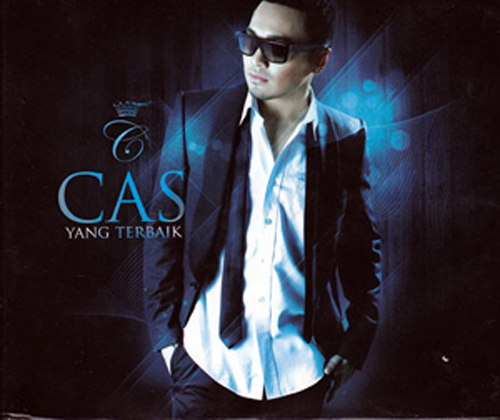
CAS - Yang Terbaik [2011]-H2O
ARTIS...: CAS
ALBUM TITLE...: CAS - Yang Terbaik
Release of Year...: 2011
Bitrate...: 128Kbps
Size...: 45MB
TRACKLIST
01. Teman Curhat
02. Yang Terbaik
03. Harus Bagaimana
04. Cinta Denganmu
05. Apa Yang Kau Mau
06. With You (feat. Dewi Sandra)
07. Superstar
08. Mingle With You
09. You Got What I Need
10. Karena Ku Yakin
11. No One Else
12. Stays Here
13. Hanya Satu
14. Ku Pergi`missing`
CAS - Yang Terbaik [2011]-H2O | 45MB
Hotfile
http://hotfile.com/dl/97579289/27c1f93/CAS-Yang-Terbaik-2011-H2O.zip.html
Fileserve
http://www.fileserve.com/file/EzBv7T5/CAS-Yang-Terbaik-2011-H2O.zip
CAS - Yang Terbaik [2011]-H2O
CAS - Yang Terbaik [2011]-H2O
ARTIS...: CAS
ALBUM TITLE...: CAS - Yang Terbaik
Release of Year...: 2011
Bitrate...: 128Kbps
Size...: 45MB
TRACKLIST
01. Teman Curhat
02. Yang Terbaik
03. Harus Bagaimana
04. Cinta Denganmu
05. Apa Yang Kau Mau
06. With You (feat. Dewi Sandra)
07. Superstar
08. Mingle With You
09. You Got What I Need
10. Karena Ku Yakin
11. No One Else
12. Stays Here
13. Hanya Satu
14. Ku Pergi`missing`
Hotfile
http://hotfile.com/dl/97579289/27c1f93/CAS-Yang-Terbaik-2011-H2O.zip.html
Fileserve
http://www.fileserve.com/file/EzBv7T5/CAS-Yang-Terbaik-2011-H2O.zip
ACDSee Systems Canvas with GIS Plus 12.0 Build 1398
by almer el hawari

ACDSee Systems Canvas with GIS Plus 12.0 Build 1398 | 136 MB
Canvas 12 with GIS+ is the only GIS data visualization solution in the market that allows GIS professionals – in the oil, gas, and energy sectors, aerospace and automotive industries, education, and government – to accurately communicate the results of their research analysis inside a true graphics application. Canvas 12 with GIS+ is loaded with new tools to provide greater control over technical illustrations, enable more powerful publishing and collaboration, and streamline overall workflows. Simply import GIS project information and use Canvas 12’s powerful vector object illustration and advanced raster image editing tools to assemble, annotate and enhance your data - in one integrated, flexible design environment. Speed up and streamline your workflow from initial import and design to final presentation, facilitate collaboration, and improve overall productivity with the complete technical illustration and GIS data visualization solution.• Handle it all – including GIS file formats
Canvas 12 with GIS+ can handle all your data import needs. In addition to the 100+ file formats, including DXF, DWG, CGM, Adobe®1 PDF, and RAW that comes standard in Canvas 12, the GIS+ module supports 18 GIS specialized file types, such as SHAPE, MapInfo and ARC/INFO. Augment, apply effects, and export to another format. You can even export to multiple formats simultaneously.
• Work flexibly with vector objects
Illustrate, edit and augment all forms of complex visual objects with Canvas 12's wide variety of professional tools and powerful Sprite technology. New features allow you to rejoin segment objects into one and fill the intersections of overlapping objects with a single click, while its proprietary SpriteLayers and SpriteEffects can be used to apply image and transparency effects without affecting the original object.
• Access raster image editing tools
Why work within limits? Canvas 12 comes complete with a full suite of raster image editing features. Create, edit and augment raster images with a host of industry standard and specialized techniques, tools and filters. Design image compositions, retouch photos, paint and color-correct scanned images, create transparency effects and vignettes, age photos, clone pixels and much more. Work with both raster images and vector images at the same time, with access to the same tools, to enhance objects and images in countless ways, all in a georeferenced environment.
• Draw and dimension with precision
Create visuals from both raw and technical data. Choose from a variety of methods to input your exact coordinates, and Canvas 12, with its ability to represent any object property to within .035 microns, accurately turns your data into strong, real-time visual content that you can then enhance, review and publish. Resize and scale objects, add fill and stroke inks, widths and other attributes, and draw shapes – all with measured precision and placement.
• Add on-the-fly illustration objects
Instantly add re-usable dynamic objects to your georeferenced work. Access hundreds of commonly used and specialized technical symbols from Canvas 12's pre-loaded Symbol Library collection, or create your own custom symbols using any vector, text or composite object. You can also create custom symbol links and pen strokes, and manage them all with flexibility. Move, add keywords, and re-categorize symbols to match your unique workflow needs.
• Make the most of your GIS data
Apply a host of image filters, transparency effects, annotation tools, image warping techniques, in addition to visual analysis and symbology tools, to create an easy-to-understand representation of your georeferenced work.
• Integrate into seismic and petrochemical workflows
Canvas 12 with GIS+ fully supports CGM*PIP files, helping increase productivity and streamline seismic-related workflows. Its CGM*PIP Import filter has received acclaim for its ability to successfully work with files from UNIX-based seismic interpretation applications. You can also import raw seismic visual data, augment, annotate, color and edit it numerically, and then combine the results with professionally formatted text in a multi-page document ready for sharing – all in a single environment. Throughout the process, illustrations and documentation retain the high level of accuracy demanded by professionals within the seismic and petrochemical industries.
• Say goodbye to distractions
Since the GIS+ module is integrated within Canvas 12, you benefit from all of its intuitive interface and customizable tool and menu options designed to make it easy to find what you need. Enjoy one stop access to inks and styles, organize your workspace to maximize productivity, and work faster with shortcuts, smart toolboxes, and interface enhancements.
• Publish your GIS data professionally
Create great-looking publications and presentations of your GIS data, in collaboration with colleagues. Canvas 12 has everything needed to design professional documents and presentations, including the Symbol Library and pre-installed Canvas symbol sets, top quality raster image rendering, robust page and text formatting, flowchart integration, and a host of pre-press tools. Apply password and encryption protection, and share your enhanced GIS data in a variety of print and Web-ready presentation formats, including HTML and Adobe® PDF complete with interactive hyperlinks.
Home Page - http://www.acdsee.com

Fileserve
http://fileserve.com/file/dW2cSxZ
Filesonic
http://www.filesonic.com/file/59372696/ACD.Systems.Canvas.with.GIS.Plus.v12.0.1398.rar
Hotfile
http://hotfile.com/dl/99101698/9785978/ACD.Systems.Canvas.with.GIS.Plus.v12.0.1398.rar.html
Bitshare
http://bitshare.com/files/xekhmsqk/ACD.Systems.Canvas.with.GIS.Plus.v12.0.1398.rar.html
ACDSee Systems Canvas with GIS Plus 12.0 Build 1398 | 136 MB
Canvas 12 with GIS+ is the only GIS data visualization solution in the market that allows GIS professionals – in the oil, gas, and energy sectors, aerospace and automotive industries, education, and government – to accurately communicate the results of their research analysis inside a true graphics application. Canvas 12 with GIS+ is loaded with new tools to provide greater control over technical illustrations, enable more powerful publishing and collaboration, and streamline overall workflows. Simply import GIS project information and use Canvas 12’s powerful vector object illustration and advanced raster image editing tools to assemble, annotate and enhance your data - in one integrated, flexible design environment. Speed up and streamline your workflow from initial import and design to final presentation, facilitate collaboration, and improve overall productivity with the complete technical illustration and GIS data visualization solution.• Handle it all – including GIS file formats
Canvas 12 with GIS+ can handle all your data import needs. In addition to the 100+ file formats, including DXF, DWG, CGM, Adobe®1 PDF, and RAW that comes standard in Canvas 12, the GIS+ module supports 18 GIS specialized file types, such as SHAPE, MapInfo and ARC/INFO. Augment, apply effects, and export to another format. You can even export to multiple formats simultaneously.
• Work flexibly with vector objects
Illustrate, edit and augment all forms of complex visual objects with Canvas 12's wide variety of professional tools and powerful Sprite technology. New features allow you to rejoin segment objects into one and fill the intersections of overlapping objects with a single click, while its proprietary SpriteLayers and SpriteEffects can be used to apply image and transparency effects without affecting the original object.
• Access raster image editing tools
Why work within limits? Canvas 12 comes complete with a full suite of raster image editing features. Create, edit and augment raster images with a host of industry standard and specialized techniques, tools and filters. Design image compositions, retouch photos, paint and color-correct scanned images, create transparency effects and vignettes, age photos, clone pixels and much more. Work with both raster images and vector images at the same time, with access to the same tools, to enhance objects and images in countless ways, all in a georeferenced environment.
• Draw and dimension with precision
Create visuals from both raw and technical data. Choose from a variety of methods to input your exact coordinates, and Canvas 12, with its ability to represent any object property to within .035 microns, accurately turns your data into strong, real-time visual content that you can then enhance, review and publish. Resize and scale objects, add fill and stroke inks, widths and other attributes, and draw shapes – all with measured precision and placement.
• Add on-the-fly illustration objects
Instantly add re-usable dynamic objects to your georeferenced work. Access hundreds of commonly used and specialized technical symbols from Canvas 12's pre-loaded Symbol Library collection, or create your own custom symbols using any vector, text or composite object. You can also create custom symbol links and pen strokes, and manage them all with flexibility. Move, add keywords, and re-categorize symbols to match your unique workflow needs.
• Make the most of your GIS data
Apply a host of image filters, transparency effects, annotation tools, image warping techniques, in addition to visual analysis and symbology tools, to create an easy-to-understand representation of your georeferenced work.
• Integrate into seismic and petrochemical workflows
Canvas 12 with GIS+ fully supports CGM*PIP files, helping increase productivity and streamline seismic-related workflows. Its CGM*PIP Import filter has received acclaim for its ability to successfully work with files from UNIX-based seismic interpretation applications. You can also import raw seismic visual data, augment, annotate, color and edit it numerically, and then combine the results with professionally formatted text in a multi-page document ready for sharing – all in a single environment. Throughout the process, illustrations and documentation retain the high level of accuracy demanded by professionals within the seismic and petrochemical industries.
• Say goodbye to distractions
Since the GIS+ module is integrated within Canvas 12, you benefit from all of its intuitive interface and customizable tool and menu options designed to make it easy to find what you need. Enjoy one stop access to inks and styles, organize your workspace to maximize productivity, and work faster with shortcuts, smart toolboxes, and interface enhancements.
• Publish your GIS data professionally
Create great-looking publications and presentations of your GIS data, in collaboration with colleagues. Canvas 12 has everything needed to design professional documents and presentations, including the Symbol Library and pre-installed Canvas symbol sets, top quality raster image rendering, robust page and text formatting, flowchart integration, and a host of pre-press tools. Apply password and encryption protection, and share your enhanced GIS data in a variety of print and Web-ready presentation formats, including HTML and Adobe® PDF complete with interactive hyperlinks.
Home Page - http://www.acdsee.com
Fileserve
http://fileserve.com/file/dW2cSxZ
Filesonic
http://www.filesonic.com/file/59372696/ACD.Systems.Canvas.with.GIS.Plus.v12.0.1398.rar
Hotfile
http://hotfile.com/dl/99101698/9785978/ACD.Systems.Canvas.with.GIS.Plus.v12.0.1398.rar.html
Bitshare
http://bitshare.com/files/xekhmsqk/ACD.Systems.Canvas.with.GIS.Plus.v12.0.1398.rar.html
ACDSee Systems Canvas with GIS Plus 12.0 Build 1398
by almer el hawari
ACDSee Systems Canvas with GIS Plus 12.0 Build 1398 | 136 MB
Canvas 12 with GIS+ is the only GIS data visualization solution in the market that allows GIS professionals – in the oil, gas, and energy sectors, aerospace and automotive industries, education, and government – to accurately communicate the results of their research analysis inside a true graphics application. Canvas 12 with GIS+ is loaded with new tools to provide greater control over technical illustrations, enable more powerful publishing and collaboration, and streamline overall workflows. Simply import GIS project information and use Canvas 12’s powerful vector object illustration and advanced raster image editing tools to assemble, annotate and enhance your data - in one integrated, flexible design environment. Speed up and streamline your workflow from initial import and design to final presentation, facilitate collaboration, and improve overall productivity with the complete technical illustration and GIS data visualization solution.• Handle it all – including GIS file formats
Canvas 12 with GIS+ can handle all your data import needs. In addition to the 100+ file formats, including DXF, DWG, CGM, Adobe®1 PDF, and RAW that comes standard in Canvas 12, the GIS+ module supports 18 GIS specialized file types, such as SHAPE, MapInfo and ARC/INFO. Augment, apply effects, and export to another format. You can even export to multiple formats simultaneously.
• Work flexibly with vector objects
Illustrate, edit and augment all forms of complex visual objects with Canvas 12's wide variety of professional tools and powerful Sprite technology. New features allow you to rejoin segment objects into one and fill the intersections of overlapping objects with a single click, while its proprietary SpriteLayers and SpriteEffects can be used to apply image and transparency effects without affecting the original object.
• Access raster image editing tools
Why work within limits? Canvas 12 comes complete with a full suite of raster image editing features. Create, edit and augment raster images with a host of industry standard and specialized techniques, tools and filters. Design image compositions, retouch photos, paint and color-correct scanned images, create transparency effects and vignettes, age photos, clone pixels and much more. Work with both raster images and vector images at the same time, with access to the same tools, to enhance objects and images in countless ways, all in a georeferenced environment.
• Draw and dimension with precision
Create visuals from both raw and technical data. Choose from a variety of methods to input your exact coordinates, and Canvas 12, with its ability to represent any object property to within .035 microns, accurately turns your data into strong, real-time visual content that you can then enhance, review and publish. Resize and scale objects, add fill and stroke inks, widths and other attributes, and draw shapes – all with measured precision and placement.
• Add on-the-fly illustration objects
Instantly add re-usable dynamic objects to your georeferenced work. Access hundreds of commonly used and specialized technical symbols from Canvas 12's pre-loaded Symbol Library collection, or create your own custom symbols using any vector, text or composite object. You can also create custom symbol links and pen strokes, and manage them all with flexibility. Move, add keywords, and re-categorize symbols to match your unique workflow needs.
• Make the most of your GIS data
Apply a host of image filters, transparency effects, annotation tools, image warping techniques, in addition to visual analysis and symbology tools, to create an easy-to-understand representation of your georeferenced work.
• Integrate into seismic and petrochemical workflows
Canvas 12 with GIS+ fully supports CGM*PIP files, helping increase productivity and streamline seismic-related workflows. Its CGM*PIP Import filter has received acclaim for its ability to successfully work with files from UNIX-based seismic interpretation applications. You can also import raw seismic visual data, augment, annotate, color and edit it numerically, and then combine the results with professionally formatted text in a multi-page document ready for sharing – all in a single environment. Throughout the process, illustrations and documentation retain the high level of accuracy demanded by professionals within the seismic and petrochemical industries.
• Say goodbye to distractions
Since the GIS+ module is integrated within Canvas 12, you benefit from all of its intuitive interface and customizable tool and menu options designed to make it easy to find what you need. Enjoy one stop access to inks and styles, organize your workspace to maximize productivity, and work faster with shortcuts, smart toolboxes, and interface enhancements.
• Publish your GIS data professionally
Create great-looking publications and presentations of your GIS data, in collaboration with colleagues. Canvas 12 has everything needed to design professional documents and presentations, including the Symbol Library and pre-installed Canvas symbol sets, top quality raster image rendering, robust page and text formatting, flowchart integration, and a host of pre-press tools. Apply password and encryption protection, and share your enhanced GIS data in a variety of print and Web-ready presentation formats, including HTML and Adobe® PDF complete with interactive hyperlinks.
Home Page - http://www.acdsee.com
Fileserve
http://fileserve.com/file/dW2cSxZ
Filesonic
http://www.filesonic.com/file/59372696/ACD.Systems.Canvas.with.GIS.Plus.v12.0.1398.rar
Hotfile
http://hotfile.com/dl/99101698/9785978/ACD.Systems.Canvas.with.GIS.Plus.v12.0.1398.rar.html
Bitshare
http://bitshare.com/files/xekhmsqk/ACD.Systems.Canvas.with.GIS.Plus.v12.0.1398.rar.html
ACDSee Systems Canvas with GIS Plus 12.0 Build 1398 | 136 MB
Canvas 12 with GIS+ is the only GIS data visualization solution in the market that allows GIS professionals – in the oil, gas, and energy sectors, aerospace and automotive industries, education, and government – to accurately communicate the results of their research analysis inside a true graphics application. Canvas 12 with GIS+ is loaded with new tools to provide greater control over technical illustrations, enable more powerful publishing and collaboration, and streamline overall workflows. Simply import GIS project information and use Canvas 12’s powerful vector object illustration and advanced raster image editing tools to assemble, annotate and enhance your data - in one integrated, flexible design environment. Speed up and streamline your workflow from initial import and design to final presentation, facilitate collaboration, and improve overall productivity with the complete technical illustration and GIS data visualization solution.• Handle it all – including GIS file formats
Canvas 12 with GIS+ can handle all your data import needs. In addition to the 100+ file formats, including DXF, DWG, CGM, Adobe®1 PDF, and RAW that comes standard in Canvas 12, the GIS+ module supports 18 GIS specialized file types, such as SHAPE, MapInfo and ARC/INFO. Augment, apply effects, and export to another format. You can even export to multiple formats simultaneously.
• Work flexibly with vector objects
Illustrate, edit and augment all forms of complex visual objects with Canvas 12's wide variety of professional tools and powerful Sprite technology. New features allow you to rejoin segment objects into one and fill the intersections of overlapping objects with a single click, while its proprietary SpriteLayers and SpriteEffects can be used to apply image and transparency effects without affecting the original object.
• Access raster image editing tools
Why work within limits? Canvas 12 comes complete with a full suite of raster image editing features. Create, edit and augment raster images with a host of industry standard and specialized techniques, tools and filters. Design image compositions, retouch photos, paint and color-correct scanned images, create transparency effects and vignettes, age photos, clone pixels and much more. Work with both raster images and vector images at the same time, with access to the same tools, to enhance objects and images in countless ways, all in a georeferenced environment.
• Draw and dimension with precision
Create visuals from both raw and technical data. Choose from a variety of methods to input your exact coordinates, and Canvas 12, with its ability to represent any object property to within .035 microns, accurately turns your data into strong, real-time visual content that you can then enhance, review and publish. Resize and scale objects, add fill and stroke inks, widths and other attributes, and draw shapes – all with measured precision and placement.
• Add on-the-fly illustration objects
Instantly add re-usable dynamic objects to your georeferenced work. Access hundreds of commonly used and specialized technical symbols from Canvas 12's pre-loaded Symbol Library collection, or create your own custom symbols using any vector, text or composite object. You can also create custom symbol links and pen strokes, and manage them all with flexibility. Move, add keywords, and re-categorize symbols to match your unique workflow needs.
• Make the most of your GIS data
Apply a host of image filters, transparency effects, annotation tools, image warping techniques, in addition to visual analysis and symbology tools, to create an easy-to-understand representation of your georeferenced work.
• Integrate into seismic and petrochemical workflows
Canvas 12 with GIS+ fully supports CGM*PIP files, helping increase productivity and streamline seismic-related workflows. Its CGM*PIP Import filter has received acclaim for its ability to successfully work with files from UNIX-based seismic interpretation applications. You can also import raw seismic visual data, augment, annotate, color and edit it numerically, and then combine the results with professionally formatted text in a multi-page document ready for sharing – all in a single environment. Throughout the process, illustrations and documentation retain the high level of accuracy demanded by professionals within the seismic and petrochemical industries.
• Say goodbye to distractions
Since the GIS+ module is integrated within Canvas 12, you benefit from all of its intuitive interface and customizable tool and menu options designed to make it easy to find what you need. Enjoy one stop access to inks and styles, organize your workspace to maximize productivity, and work faster with shortcuts, smart toolboxes, and interface enhancements.
• Publish your GIS data professionally
Create great-looking publications and presentations of your GIS data, in collaboration with colleagues. Canvas 12 has everything needed to design professional documents and presentations, including the Symbol Library and pre-installed Canvas symbol sets, top quality raster image rendering, robust page and text formatting, flowchart integration, and a host of pre-press tools. Apply password and encryption protection, and share your enhanced GIS data in a variety of print and Web-ready presentation formats, including HTML and Adobe® PDF complete with interactive hyperlinks.
Home Page - http://www.acdsee.com
Fileserve
http://fileserve.com/file/dW2cSxZ
Filesonic
http://www.filesonic.com/file/59372696/ACD.Systems.Canvas.with.GIS.Plus.v12.0.1398.rar
Hotfile
http://hotfile.com/dl/99101698/9785978/ACD.Systems.Canvas.with.GIS.Plus.v12.0.1398.rar.html
Bitshare
http://bitshare.com/files/xekhmsqk/ACD.Systems.Canvas.with.GIS.Plus.v12.0.1398.rar.html
Xara Designer Pro 6.1.1
by almer el hawari

Xara Designer Pro 6.1.1 | 107.44 MBXara Designer Pro (formerly Xtreme Pro) is our top of the range product and includes all the features and templates of Web Designer and Photo & Graphic Designer. Plus it adds extra features that Pro designers need including support for PDF/X, PANTONE® and color separations, multi-core processor support for extra speed, enhanced import/export filters, a pro version of the photo panorama tool and more.Xara Xtreme is quite simply the world's fastest graphics software, with truly flexible illustration tools and revolutionary photo handling. It will form an integral part of your creative workflow, whether it's vector drawings, DTP designs, photo compositions or Flash animations for your website. The world's fastest, slickest, and highest quality vector 3D extrude tool. Take any shape, and just drag on the face to create a beautifully lit and shaded 3D version. Drag on the sides to extend the extrude depth. It couldn't be easier. Xara Xtreme photo handling beats other graphics programs on many fronts: It's much much faster, produces files that can be 10x or more smaller. Being entirely object oriented means completely non-destructive photo editing, and uses a fraction of the RAM required by other products. It can handle multiple very high resolution images with ease, even on a modest PC. It makes the perfect photo composition tool.
Xara Xtreme is used by many different types of customer in a spectacular range of uses - for designs combining drawings, text and photos, for print and the web - so we understand how important it is to offer compatibility with other products and users.
Xtreme offers support for a huge range of file formats, making it easy to exchange your work with other users and programs. This includes common bitmap types (eg GIF, JPEG, BMP, PNG, TIFF, PSD, and RAW photos) and key vector types (eg PDF and AI/EPS, and EMF/WMF). For text Xara Xtreme supports RTF (Rich Text Format).
Xara Xtreme has full support for importing and exporting Adobe Photoshop® PSD files including layer support.
Xara Xtreme offers industry leading export of super-clean, very compact PDF files (including support for graduated color fills and flat / graduated transparency).
Xara Xtreme Pro offers the ability to produce CMYK color separations. This includes on-screen preview of CMYK and spot color plates, PANTONE® color support, spot colors, on-screen printer gamut preview and a lot more.
Xara Xtreme Pro supports both XPS import and export. This is an entirely new ‘page description’ file format invented by Microsoft that's vector based, and so is ideal as a resolution-independent portable document format.
Xara Xtreme offers the easiest way to create really efficient Flash animations.
Xara Xtreme has the world's most sophisticated, highest performance vector rendering engine. Quite simply this makes it the fastest graphics software to be found.
Home Page - http://www.xara.com/us/
Fileserve
http://fileserve.com/file/W27JaV3
Filesonic
http://www.filesonic.com/file/59389670/Xara.Designer.Pro.6.1.1.rar
Hotfile
http://hotfile.com/dl/99141104/643005f/Xara.Designer.Pro.6.1.1.rar.html
Bitshare
http://bitshare.com/files/d4zuwgli/Xara.Designer.Pro.6.1.1.rar.html
Xara Designer Pro 6.1.1
Xara Designer Pro 6.1.1 | 107.44 MBXara Designer Pro (formerly Xtreme Pro) is our top of the range product and includes all the features and templates of Web Designer and Photo & Graphic Designer. Plus it adds extra features that Pro designers need including support for PDF/X, PANTONE® and color separations, multi-core processor support for extra speed, enhanced import/export filters, a pro version of the photo panorama tool and more.Xara Xtreme is quite simply the world's fastest graphics software, with truly flexible illustration tools and revolutionary photo handling. It will form an integral part of your creative workflow, whether it's vector drawings, DTP designs, photo compositions or Flash animations for your website. The world's fastest, slickest, and highest quality vector 3D extrude tool. Take any shape, and just drag on the face to create a beautifully lit and shaded 3D version. Drag on the sides to extend the extrude depth. It couldn't be easier. Xara Xtreme photo handling beats other graphics programs on many fronts: It's much much faster, produces files that can be 10x or more smaller. Being entirely object oriented means completely non-destructive photo editing, and uses a fraction of the RAM required by other products. It can handle multiple very high resolution images with ease, even on a modest PC. It makes the perfect photo composition tool.
Xara Xtreme is used by many different types of customer in a spectacular range of uses - for designs combining drawings, text and photos, for print and the web - so we understand how important it is to offer compatibility with other products and users.
Xtreme offers support for a huge range of file formats, making it easy to exchange your work with other users and programs. This includes common bitmap types (eg GIF, JPEG, BMP, PNG, TIFF, PSD, and RAW photos) and key vector types (eg PDF and AI/EPS, and EMF/WMF). For text Xara Xtreme supports RTF (Rich Text Format).
Xara Xtreme has full support for importing and exporting Adobe Photoshop® PSD files including layer support.
Xara Xtreme offers industry leading export of super-clean, very compact PDF files (including support for graduated color fills and flat / graduated transparency).
Xara Xtreme Pro offers the ability to produce CMYK color separations. This includes on-screen preview of CMYK and spot color plates, PANTONE® color support, spot colors, on-screen printer gamut preview and a lot more.
Xara Xtreme Pro supports both XPS import and export. This is an entirely new ‘page description’ file format invented by Microsoft that's vector based, and so is ideal as a resolution-independent portable document format.
Xara Xtreme offers the easiest way to create really efficient Flash animations.
Xara Xtreme has the world's most sophisticated, highest performance vector rendering engine. Quite simply this makes it the fastest graphics software to be found.
Home Page - http://www.xara.com/us/
Fileserve
http://fileserve.com/file/W27JaV3
Filesonic
http://www.filesonic.com/file/59389670/Xara.Designer.Pro.6.1.1.rar
Hotfile
http://hotfile.com/dl/99141104/643005f/Xara.Designer.Pro.6.1.1.rar.html
Bitshare
http://bitshare.com/files/d4zuwgli/Xara.Designer.Pro.6.1.1.rar.html
Langganan:
Komentar (Atom)